
Meshtastic
Meshtastic: off-grid messaging with radio.
Meshtastic is one of the fastest-growing areas of interest for radio, makers, walkers, emergency-preparedness groups and experimenters. It uses small LoRa radio devices to send short text messages through a local mesh network, without needing mobile signal, Wi-Fi or the internet.
A modern way to get people experimenting with radio.
Meshtastic is easy to understand, inexpensive to try, and instantly visual. You can build a node, put it on the air, see other stations, pass messages, test antennas and expand local coverage. That makes it a strong gateway into the wider radio hobby.
No mobile network required
Messages are sent over LoRa radio links. A phone is useful for typing and viewing messages, but the actual mesh communication happens between the radio nodes.
Decentralised by design
Nodes can repeat messages for each other, helping extend coverage across an area without a single central repeater or internet connection being required.
Great for learning
It brings together antennas, propagation, batteries, GPS, Bluetooth, firmware, mapping and practical RF testing in a way that new people can see working immediately.
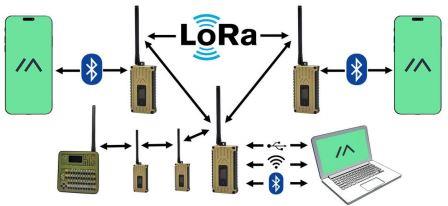
Small radio nodes build a local network.
Each Meshtastic node is a small LoRa radio. When a message is sent, nearby nodes can receive it and, depending on settings, pass it onwards. This creates a mesh where coverage can grow as more people install nodes in sensible locations.
Your phone connects to your node
Most users connect by Bluetooth or USB using the Meshtastic app. The phone gives you the screen and keyboard; the node does the radio work.
The node sends a LoRa packet
LoRa is designed for long-range, low-power data. It is not high-speed internet; it is ideal for short text messages, position beacons and small telemetry-style packets.
Other nodes can pass it on
The more well-positioned nodes there are, the stronger the local mesh becomes. Height, antenna quality and sensible configuration make a big difference.
Why people are getting interested.
UK setup note
In the UK, Meshtastic lists EU_868 and EU_433 as region options. EU_868 is the common UK Meshtastic setup. Always use the correct region setting, legal power level, duty-cycle behaviour and antenna arrangement for your device.
Meshtastic is normally used under licence-exempt short-range-device rules, not as normal amateur radio. An amateur radio licence should not be treated as permission to ignore Meshtastic region limits, encryption settings, power limits, duty-cycle limits or UK SRD requirements.
A basic Meshtastic setup is simple.
You do not need a full radio shack to get started. A small compatible board, a decent antenna, a battery and the Meshtastic app are enough to begin experimenting.
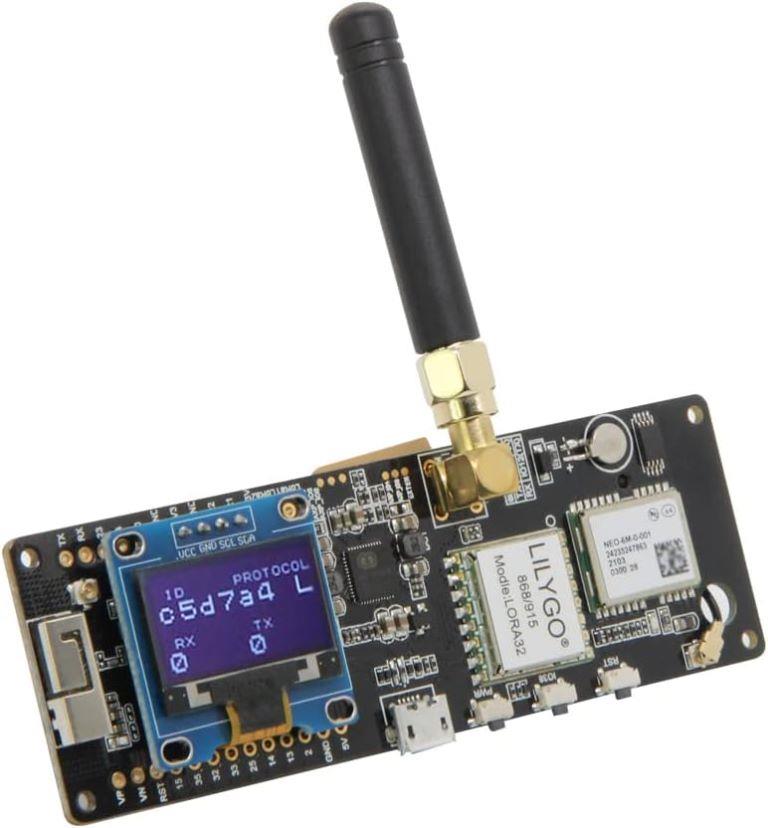
Ready-made devices
These are the easiest route for beginners. Many come with a screen, case, battery support, charging circuit and antenna connection already sorted.
- Good for first-time users.
- Usually connects to your phone by Bluetooth.
- Useful for walks, events, testing and club demonstrations.
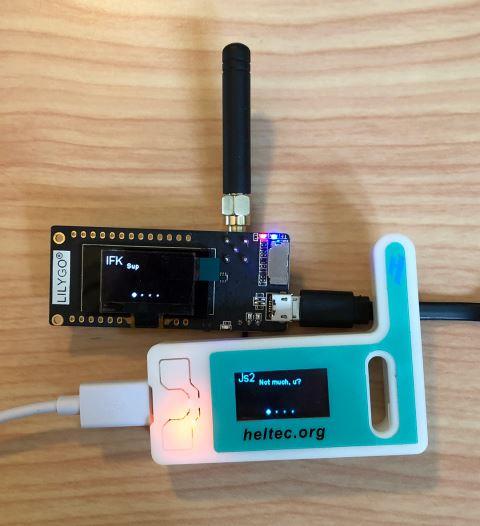
DIY boards and builds
DIY boards are ideal for experimenters. They allow you to build fixed nodes, solar nodes, rooftop nodes and custom cases for specific locations.
- ESP32 or nRF52-based Meshtastic compatible board.
- LoRa radio module for the correct UK band.
- Suitable antenna, battery and weatherproofing if used outdoors.
Come along on a Friday night and see it working.
HFDXARC members are already experimenting with Meshtastic and expanding local coverage. If you are curious about radio, electronics, antennas, off-grid messaging or emergency communications, this is a very easy project to get involved with.
Bring your questions, bring a node if you already have one, or just come along and see what the club is building. The aim is simple: more local nodes, better coverage, more experimentation and more people getting hands-on with radio.
See local and wider Meshtastic activity.
The map below is provided by MeshMap. It gives a visual idea of active nodes and wider network activity. Coverage shown on public maps depends on node settings, MQTT use and whether users choose to share location data.
Common beginner points.
Is this the same as amateur radio?
No. Meshtastic normally uses licence-exempt LoRa short-range-device bands, not amateur radio bands. It is still radio, and it is still a great way to learn about RF, antennas and propagation.
Do I need the internet?
No for local mesh messaging. Internet-connected features such as MQTT or public map visibility are optional and depend on how a node has been configured.
How far will it work?
Range depends heavily on height, terrain, antenna quality, building clutter and local noise. A handheld node indoors will not perform like a high, outdoor node with a proper antenna.